

How can a school use cameras to support safeguarding without making pupils feel watched everywhere? The answer isn’t simply to install more cameras. Well-planned school cctv systems address specific risks with proportionate coverage, and treat privacy and footage handling as part of the security plan from the outset.
It’s reasonable for school leaders, staff and families to ask where cameras belong, who can view recordings and how long footage should be kept. Entrances and corridors may have a clear security purpose, while spaces where people expect privacy call for particular care. A site assessment can help identify useful views without placing cameras where they aren’t appropriate. CCTV can help staff review incidents, but it can’t replace supervision, safeguarding procedures or a considered response.
This practical guide covers where CCTV may be useful, what to assess before installation, and how to set clear rules for access, storage and retention under relevant UK requirements. It also suggests questions to ask a prospective installer about coverage, system capacity and privacy safeguards. The aim is a system shaped by the school’s needs, not by camera count.
Key Takeaways
- Start with the security concern each camera is meant to address, rather than choosing coverage by camera count.
- Plan school cctv systems around the site layout and the privacy expectations of pupils, staff and visitors.
- Compare wired and wireless options against the school’s connectivity and installation constraints. Decide whether staff need live viewing, recorded footage or both.
- Before installation, map the risks, affected groups and purpose of each proposed camera.
- Set clear procedures for system ownership, access, footage requests and deletion, then review whether the system still meets its purpose.
What are school CCTV systems for, and what can they realistically achieve?
A school CCTV system combines cameras with recording or monitoring equipment for a clearly stated security purpose. It may help staff observe selected areas live or review footage after an incident. That purpose should determine which areas are covered, who can access the system and how it fits into the school’s wider safeguarding arrangements.
That distinction matters. Cameras can provide useful information, but they aren’t a complete security strategy. A school still needs appropriate supervision, safeguarding procedures and access management. The wider picture of school security includes different measures, with CCTV serving one role among them. Well-planned school cctv systems address specific needs rather than aiming to monitor every space.
Where can CCTV support a school's security plan?
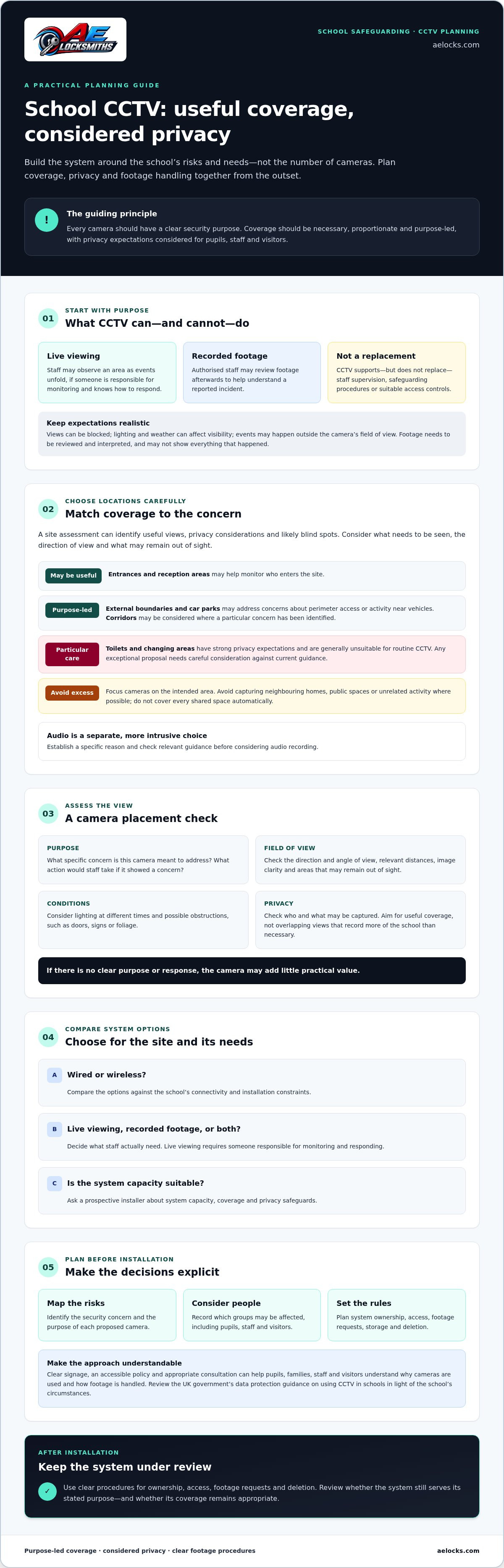
Depending on the site and the concern identified, cameras may be considered for entrances, reception areas, external boundaries, car parks or other locations. Before proposing a camera, identify what needs to be seen, the direction of view and any areas likely to remain out of sight.
Recording footage and actively monitoring live images are different arrangements. Authorised staff may use recorded footage to review a reported incident afterwards. Live viewing may allow staff to observe an area as events unfold, but only if someone is responsible for monitoring it and knows how to respond. A camera that records without being watched shouldn’t be described as providing active oversight.
What CCTV cannot do on its own
Cameras don’t guarantee that an incident won’t happen or that every event will be captured clearly. A view can be blocked, lighting and weather can affect what’s visible, and activity may take place outside the camera’s field of view. Footage also needs to be reviewed and interpreted. It can provide context, but may not show everything that happened.
For that reason, CCTV should support rather than replace staff supervision, safeguarding policies and suitable access controls. Before adding a camera, decide what action staff would take if it showed a concern. If there’s no clear purpose or response, the camera may add little practical value. A site assessment can help identify useful views and likely blind spots before installation.
How should school CCTV systems balance coverage, privacy and safeguarding?
Start with the school’s documented reason for each camera and the area it needs to cover. A camera should address a specific concern, not simply add more surveillance. Camera placement should be necessary, proportionate and purpose-led. Consider pupils, staff and visitors, as well as the privacy people reasonably expect in each space.
Which school areas may need CCTV coverage?
Entrances and reception areas may need coverage to help monitor who enters the site. Cameras overlooking car parks or external boundaries may serve a different purpose, such as reviewing activity near vehicles or perimeter access. Corridors may be considered where the school has identified a particular concern, but a camera isn’t automatically needed in every shared space.
A site assessment can help determine what each camera should capture. Check image clarity at relevant distances, lighting at different times, the camera’s viewing angle and possible obstructions such as doors, signs or foliage. Aim for useful coverage, not overlapping views that record more of the school than necessary.
How can schools reduce privacy risks?
Position cameras to focus on the intended area and avoid capturing neighbouring homes, public spaces or unrelated activity where possible. Toilets and changing areas have particularly strong privacy expectations and are generally unsuitable for routine CCTV. Any exceptional proposal needs careful consideration against current guidance. Audio recording is a separate and more intrusive choice, so schools should establish a specific reason and check relevant guidance before considering it.
Clear signage, an accessible policy and appropriate consultation can help pupils, families, staff and visitors understand why cameras are used and how footage is handled. The UK government data protection guidance explains considerations for using CCTV in schools. Decision-makers should review it in light of their circumstances rather than assume a camera is appropriate simply because it can be installed.
Good planning also means asking what the camera will miss. A doorway, for example, may be partly obscured when open, while poor lighting can make footage less useful. A local installer can assess the site layout and practical coverage needs. Schools in Liverpool and nearby areas can review CCTV installation options with AE Locksmiths, which offers CCTV installation. Confirm that the proposed work matches the school’s requirements.
What should schools compare when assessing CCTV equipment and system options?
Compare each option against the school’s site, intended camera positions and day-to-day needs. Wired systems may suit locations where cable routes and installation access are practical. Wireless options may be worth assessing where cabling is difficult, but they depend on reliable connectivity. Neither approach is automatically best. Ask the installer to explain the trade-offs for the actual site.
Also distinguish live viewing from recorded footage. Live viewing needs a clear plan for who monitors the images and how they respond. Recording footage for later review may suit a school that needs to examine reported incidents, but it still requires someone authorised to retrieve and review it. Some systems may support both. Confirm what is available and appropriate.
Which CCTV features should a school assess?
Start with the task each camera must perform. A view intended to show activity at an entrance has different requirements from one used to observe movement along a corridor. Consider lighting, weather exposure, viewing angle, distance and potential obstructions. Ask the installer to demonstrate what the image is likely to show in real conditions, rather than relying on a headline resolution alone.
The comparison below is a starting point. Technical specifications depend on the selected system and a site survey.
| Requirement | Questions to ask |
|---|---|
| Connection | Can cables be routed safely and practically, or would wireless connectivity be more suitable for this location? |
| Viewing and recording | Does the school need live images, recordings for later review, or both? |
| Image clarity | Can the camera capture enough detail for its intended view, including in low light? |
| Storage and retrieval | Can the system store footage in line with school policy and retrieve relevant recordings when required? |
| Access | Can access be restricted to authorised people with defined responsibilities? |
How should schools think about storage and access?
Storage needs depend on the number of cameras, recording settings, image quality and the school’s retention policy. Don’t assume a standard retention period applies to every school or system. Set a period that follows the school’s stated purpose and current data protection guidance, and agree the approach before installation.
Limit access to authorised people, and decide who can review, export or respond to requests for recordings. Ask how access is controlled and how relevant footage can be located without giving unnecessary people access to the whole system. These practical details matter as much as the cameras themselves. A considered comparison helps schools choose school cctv systems that fit their requirements, rather than paying for features they won’t use.
What practical steps should a school take before installing CCTV?
A clear brief helps the school decide whether cameras address a real concern and gives an installer enough context to suggest practical coverage. Define the concern, identify who may be affected, and give every proposed camera a clear purpose before choosing equipment.
How to prepare a school CCTV brief
Use these steps to move from an initial concern to a system the school can review after installation:
- Describe the concern. Record what prompted the review, where it occurs and what the school needs to understand or monitor. Note existing measures, such as supervision or access arrangements, so CCTV is considered in context.
- Map the site and affected groups. Identify relevant areas and consider how pupils, staff, parents, visitors and neighbours could be affected. Mark privacy-sensitive spaces and views that could capture areas beyond the school’s intended coverage.
- Set a purpose for each camera. State what the camera should capture and how that view would help address the concern. If the purpose is unclear, reconsider whether the camera is needed.
- Review privacy and data protection. Check current guidance and involve the person responsible for data protection. Ask whether a data protection impact assessment (DPIA) or another assessment is appropriate for the proposed use. The answer depends on the circumstances, so don’t treat this as a blanket legal conclusion.
- Plan operation and review. Decide who will operate the system, review footage and approve access. Set out how the school will explain the proposal to pupils, staff, parents and visitors through its established communication processes. After installation, check that the cameras serve their stated purposes.
What to ask a CCTV installer
Bring the brief to the discussion. Ask the installer to show how proposed camera positions address each stated purpose, and explain how the site’s lighting, layout and obstructions affect the view. Request a clear explanation of the proposed equipment, whether footage will be recorded or viewed live, how storage and access arrangements work, and what instructions or handover information the school will receive.
Check relevant experience and any claimed qualifications directly. Ask for details rather than assuming that experience in another setting means experience with schools. A site assessment can clarify practical coverage requirements, but the school remains responsible for deciding its purposes, policies and handling procedures.
Planning school cctv systems involves decisions and responsibilities as well as camera positions. For schools in Liverpool and nearby areas, AE Locksmiths’ CCTV installation information can help start a discussion about a site assessment. Confirm directly that the proposed work matches the school’s requirements.
How can a school manage CCTV responsibly after installation?
Installation is only the start. School cctv systems need a named owner, written procedures and regular checks to make sure cameras still serve their stated purpose. Review the system when the site or its security needs change, and reassess any cameras that no longer provide useful coverage.
What should a school's CCTV policy cover?
A practical policy should explain why CCTV is used, which areas are covered, who can view footage and how recordings are handled. It should also state who responds to footage requests, how decisions are recorded and when footage is deleted. The school should check its procedures against current Information Commissioner’s Office (ICO) guidance and its data protection responsibilities. An installer can advise on equipment and assess the site, but installation alone doesn’t establish that the school’s use of CCTV meets its responsibilities.
Keep access limited to people with a defined role. Staff should know how to request or review footage, who authorises access and what to do if a recording relates to an incident. Set retention and deletion arrangements through the school’s policy and current guidance, rather than assuming recordings should be kept for a fixed period. For more on planning a local installation, see this guide to CCTV installation in Liverpool.
Review the policy and system periodically. Check that access permissions remain appropriate, footage can be retrieved when needed and cameras still capture their intended views. Keep a record of reviews and update staff instructions when procedures change.
How does CCTV fit with other school security measures?
CCTV can complement other measures, but it doesn’t replace them. An alarm may alert staff to an event, while footage may help them review what happened. Read more about intruder alarm installation guidance when considering how alarms might fit into a wider security plan. Controlled entry can help manage who accesses parts of a site; see this guide to fob and card access control.
Schools in Liverpool and surrounding areas can also consider a site assessment and equipment options from AE Locksmiths, a local family-run company offering CCTV installation. An assessment can help clarify practical coverage, while the school remains responsible for its purposes, policies and footage-handling arrangements.
Make your next CCTV decision with confidence
Good school cctv systems start with a clear security purpose, not a target number of cameras. Coverage should reflect the site and respect the privacy of pupils, staff and visitors. Once installed, the system also needs clear ownership, sensible access controls and regular reviews.
Before moving ahead, bring together the school’s concerns, proposed camera locations and plans for handling footage. Compare equipment against those needs, and check current data protection guidance as part of planning. An installer can help assess the site and explain practical options, but the school remains responsible for its policies and decisions.
AE Locksmiths is a family-run locksmith company based in Liverpool, offering CCTV installation in Liverpool and surrounding areas. To discuss a site assessment and CCTV options for your school, contact AE Locksmiths and confirm whether your location is covered.
Frequently Asked Questions
Are CCTV cameras allowed in schools?
Yes, schools can use CCTV where they have a clear and justified security purpose. School cctv systems should be planned with privacy, necessity and proportionality in mind, and footage should be protected with access limited to appropriate people. UK data protection requirements may apply, so check current Information Commissioner’s Office guidance and the school’s responsibilities before installation. CCTV can support safeguarding procedures, but it doesn’t replace staff supervision or other security measures.
Can schools put CCTV cameras in classrooms?
Classroom cameras aren’t automatically appropriate just because a school can install them. The school should establish a clear, specific reason, consider the impact on pupils and staff, and check relevant data protection guidance before proceeding. Consider whether another measure could address the concern with less intrusion. Explain the purpose and arrangements to people affected, and document the decision. Cameras should never be treated as a substitute for teaching staff, supervision or safeguarding practice.
Where should CCTV cameras be placed in a school?
Possible locations include entrances, reception areas, corridors, car parks and external boundaries, if each camera has a clear purpose. Placement should account for lighting, viewing angles, obstructions and privacy, and avoid areas where people expect a high degree of privacy, such as toilets and changing rooms. A site assessment can help identify practical coverage. AE Locksmiths offers CCTV installation in Liverpool and surrounding areas, including Warrington, Wirral, St Helens, Widnes, Chester and Northwich. Confirm availability for your school’s location.
How long can a school keep CCTV footage?
There isn’t one retention period that suits every school or purpose. The school should set a period based on why footage is collected, document that decision and check it against current data protection guidance and its own policy. Footage shouldn’t be kept simply because storage is available. If a particular recording relates to a reported incident, the school should assess whether it needs to retain that footage and record the reason.
Who can access school CCTV footage?
Access should be limited to authorised people who need footage to carry out defined responsibilities. A school policy should state who can view or retrieve recordings, who approves access and how requests are handled. A request from a pupil, parent or another person doesn’t automatically mean footage can be shared unedited. Other people may appear in the recording, so the school should assess the request under current data protection guidance and protect their privacy.
Do schools need to tell parents and staff about CCTV?
Schools should be transparent about CCTV and explain its purpose to people who may be recorded. Clear signs can alert visitors, while the school’s privacy information and established communication channels can give pupils, parents and staff more detail. Explain where cameras operate, who is responsible for the system and how footage is handled. Telling people about surveillance is different from asking for consent, so schools should check their data protection responsibilities rather than assume consent is the right basis.
Can school CCTV record audio?
Some CCTV equipment can record sound, but audio raises separate and more intrusive privacy concerns than video. A school shouldn’t enable it simply because the equipment allows it. Decision-makers should identify a specific need, consider whether a less intrusive option would work and check current Information Commissioner’s Office guidance before recording conversations. Explain any audio use clearly and document the reasoning. If there’s no strong, defined purpose, leave audio recording out of the system.


