

Could CCTV help protect a service yard or car park without creating privacy problems? Commercial CCTV installation in Warrington needs to account for both. If your business records identifiable people, you need a clear purpose for filming, should limit recording to necessary areas and must protect the footage. Display signs explaining that CCTV is operating and why.
It’s understandable to focus first on camera coverage. But a useful system also depends on thoughtful placement, reliable recording and a clear process for handling footage requests. Businesses must provide images containing someone’s personal data when requested, within one calendar month.
This article explains the rules for commercial CCTV in the UK, along with practical steps for managing footage. It also covers camera options for business premises, what installation involves, and how maintenance and repairs can help keep a system working as intended. Whether you’re reviewing an existing setup or planning coverage for a new space, use this guidance to make a considered decision.
Key Takeaways
- Plan camera positions around the areas your business needs to monitor, while keeping recording focused on necessary spaces.
- Understand how camera coverage, image quality and secure remote viewing can support different premises and operating needs.
- Build regular checks of recording, storage, connections and camera positions into your system’s maintenance plan.
- Use clear CCTV signs, protect recorded footage and be ready to respond to requests for personal data within one calendar month.
How will commercial CCTV camera installation affect my business?
A suitable system helps staff review incidents and monitor important areas across business premises. Its design should fit your site, daily operations and approach to managing footage.
CCTV Design for Different Premises
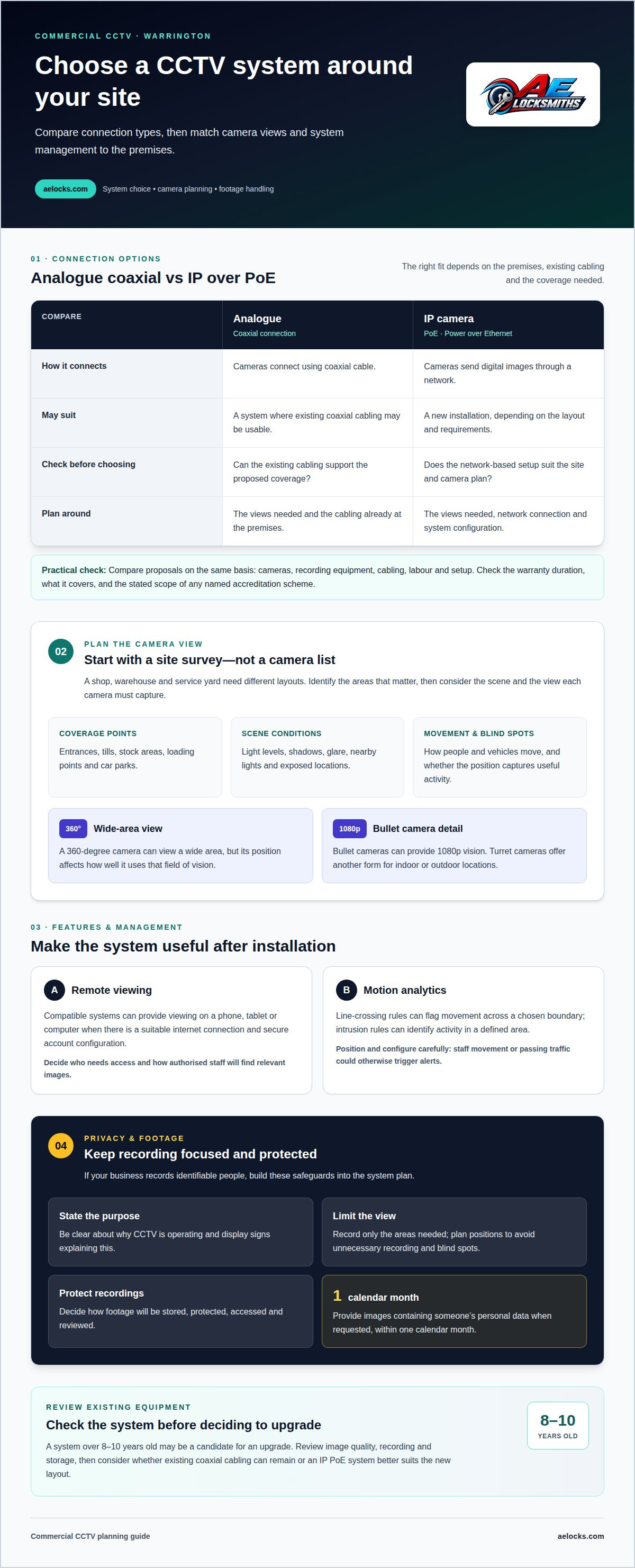
A Warrington shop, warehouse and service yard each need a different camera layout. Start by identifying entrances, tills, stock areas, loading points and car parks that need coverage. A 360-degree camera can view a wide area, but its position affects how well it uses that field of vision. Bespoke planning helps avoid blind spots and unnecessary recording. For a Cheshire premises, the layout should reflect its specific risks, not simply copy another site’s plan.
System Features and Management
Compatible systems can provide remote viewing on a phone, tablet or computer, provided there’s a suitable internet connection and secure account configuration. The cameras selected for a commercial unit may provide 24/7 access to images. Decide who needs access, how footage will be reviewed and how recordings will be protected. These management steps help make the system useful after installation, rather than leaving staff unsure how to find relevant images.
Commercial systems include analogue cameras connected by coaxial cable and IP cameras using PoE, or Power over Ethernet. IP cameras can suit a new installation, while coaxial systems may work with existing cabling. Camera choice also depends on the scene: an entrance may need a different view from a wide car park. The right system matches its connections and coverage to your premises.
For a small business, start with the areas that matter most, such as a shop entrance, stockroom or reception. Compare camera views and recording arrangements with those needs. A commercial CCTV installation in Warrington should clearly show the proposed coverage, including what each camera can see.
Compare installation quotes by checking that each covers the same cameras, recording equipment, cabling, labour and setup. Review the warranty duration and coverage, including which equipment or work it applies to. For accreditations, compare the named scheme and its stated scope rather than assuming all credentials are equivalent.
A system over 8-10 years old may be a candidate for an upgrade. Review its image quality, recording and storage, then identify whether existing coaxial cabling can remain or an IP PoE system better suits the new layout.
IP cameras, low-light imaging and motion analytics
A site survey considers the environment: light levels, entrances, work areas and the view each camera needs. A camera facing a bright doorway may capture a different image from one covering a dim storeroom. The survey also looks at how people and vehicles move around the site, helping position cameras to capture useful footage without missing important activity.
IP cameras send digital images through a network, while camera shape and placement affect the view. Bullet cameras can provide 1080p vision, which can help show detail in recorded footage. Turret cameras offer another form for indoor or outdoor locations. Camera choice should take account of how exposed a location is and the risk of physical interference. Select cameras according to the environment and the footage staff need to review.
Some CCTV cameras support analytics such as line crossing or intrusion detection. A line-crossing rule can flag movement across a chosen boundary, such as a restricted doorway. An intrusion rule can identify activity within a defined area, such as a storage zone. Careful placement and configuration matter: routine staff movement or passing traffic could otherwise trigger alerts.
Low-light imaging is useful where a car park, loading bay or rear entrance has limited lighting. A survey should assess the actual scene, including shadows, glare and nearby lights, rather than assume every camera performs equally. If a proposal names Hikvision cameras or Texecom Connect, it should explain each item’s role and how the components work together.
For commercial CCTV installation in Warrington, camera selection should follow the site survey, not precede it. Consider the key views, the footage required and how alerts will be managed. A system of commercial CCTV cameras can then be planned around those operational needs, with each camera positioned for a clear, useful view.
Commercial CCTV supply, installation, maintenance and repair
Warrington is served by commercial CCTV firms offering supply, installation, maintenance and repair. Compare the work included, from commissioning the system to correcting faults.
CCTV Supply and Installation
Supply and installation cover the cameras, recording equipment, cabling and setup needed for the agreed coverage. A clear written scope identifies the equipment, where it will be fitted and how the system will be commissioned. This makes it easier to see whether the proposal addresses monitoring needs across entrances, work areas or a service yard.
Installation should finish with checks that each camera provides a useful view and that recording works. The installer can explain how authorised staff access footage and operate the system. Keep equipment details and setup information together so future maintenance can account for the system as installed.
Maintenance and Technical Support
Maintenance checks can cover camera positions, image quality, recording, storage, connections, power supplies and remote access. They can reveal issues such as a camera moved out of position or a recording device that has stopped saving footage. Technical support can then focus on the affected part instead of treating every fault as a camera failure.
Many businesses choose annual CCTV maintenance, though a suitable schedule depends on the system, premises and manufacturer’s guidance. A visit can confirm that each camera still covers its intended area and that recordings remain accessible. Regular checks also help staff spot changes in activity or site layout that could affect coverage.
For repairs, the fault may involve a camera, cable, power supply, recording equipment or network connection. Most CCTV repairs can be completed in one to two hours unless replacement parts are required. A camera lasts an average of 5 to 10 years, so recurring faults or ageing equipment can prompt a review of repair versus replacement. The deciding factors include image quality, reliability and whether the existing system still meets the site’s needs.
CCTV for commercial, public-service and industrial sectors
Commercial premises, public services and industrial sites have different monitoring needs. A shop may focus on entrances and customer areas, while a warehouse may need views of loading bays and stock movement. A service yard or car park may need coverage of vehicles, equipment and access points. Start with the people, processes and assets the business needs to protect.
On a working site, camera placement should reflect how the space operates. Cameras might cover vehicle entrances, goods-in areas and boundaries where equipment is stored. A public-facing organisation may also need to consider staff and visitor movement. Remote viewing can help authorised staff review activity away from the premises, with a compatible system, suitable internet connection and secure account configuration.
Recording identifiable people brings responsibilities. Businesses need a clear purpose for CCTV, should limit filming to necessary areas and must protect recorded footage. Display signs explaining that CCTV is operating and its purpose. Keep images only as long as they’re needed for business purposes, and respond appropriately when someone requests footage containing their personal data. Provide recorded images within one calendar month.
Footage management matters after installation. Set access controls so staff can review recordings for a legitimate business need, and protect storage from unauthorised access. Businesses should be prepared to share footage with authorities, such as the police, upon request, and pay any applicable data protection fee. These steps make CCTV operation more accountable than simply adding cameras to a site.
For a business reviewing its site security, map the key activities first: deliveries, staff entry, vehicle movement or public access. Then use those patterns to shape camera coverage and footage management. This gives the system a practical purpose and supports peace of mind without treating every area as a monitoring zone. Discuss commercial security for your premises as a next step.
AE Locksmiths: Commercial Locksmith
AE Locksmiths installs CCTV cameras and provides commercial locksmith services for businesses planning new security or reviewing their existing setup. If your premises needs camera coverage alongside practical attention to doors and locks, these services can address connected parts of the same security plan.
For a new installation, consider which entrances, work areas or external spaces need monitoring and how staff will manage recorded footage. For an existing setup, describe the issue, such as a camera losing its view or recording equipment failing. This helps focus the discussion on your premises and the work needed.
AE Locksmiths also provides residential locksmith services and UPVC windows and doors. For commercial premises, its commercial locksmith and CCTV camera services are the relevant options. Contact AE Locksmiths to discuss your business’s CCTV or commercial security needs.
Plan your next security step
A commercial CCTV installation in Warrington is most useful when it supports a clear plan for protecting your premises. Before moving ahead, decide which areas matter most, who needs access to footage and how the system fits your wider security arrangements. That gives the conversation a practical starting point, whether you’re planning a new setup or reviewing an existing one.
AE Locksmiths can help with CCTV cameras and commercial locksmith needs. Its Residential Locksmith and UPVC Windows & Doors services can also address other parts of property security. Choose the areas relevant to your premises and discuss the work you need.
Contact AE Locksmiths about CCTV to discuss your business’s requirements. A clear first conversation can help you take the next step with confidence.
Frequently Asked Questions
Are there commercial CCTV rules and regulations I must follow?
Yes. If your business records identifiable people, it needs a clear purpose for CCTV, should limit recording to necessary areas and must protect footage. Restrict access to staff who need recordings for their work, and set a retention period based on business needs. For example, a camera aimed at a staff entrance should not capture more of the surrounding area than its security purpose requires.
What will a commercial CCTV system cost?
The cost depends on the work required. It is shaped by the premises, camera locations, equipment, cabling and installation. A small office with existing cabling may need a different scope from a warehouse requiring coverage across several work areas. A useful quote explains the proposed equipment and work, so you can see what the price covers. AE Locksmiths offers a free phone quote where possible, and any on-site quote is also free.
What is the average cost of commercial CCTV installation in Warrington?
There isn’t one average installation cost for every Warrington business. The quote depends on system design, site layout, camera quantity, cabling and recording equipment. Installing a camera for one entrance differs from covering a service yard and internal spaces. Request a quote based on your premises and the work required, rather than relying on the cost of an unrelated project.
What factors affect commercial CCTV installation quotes, such as camera count and site size?
Camera count and site size affect the equipment and installation work required. The layout matters too: a building with several entrances, separate units or long cable routes may need a different plan from a compact shop. Quotes can also vary according to camera type, recording and storage requirements, and whether existing equipment or cabling can be reused.
How do CCTV installers assess a commercial site and plan camera placement?
An installer assesses how the premises are used, then identifies priority views such as entrances, loading areas and stock spaces. They consider lighting, obstructions, camera angles, cabling routes and where recording equipment can go. A practical survey also looks at how staff will review footage. This helps match camera positions to the site’s security purpose and avoid overlooking important activity.
What UK rules apply to business CCTV, including ICO guidance and signage?
Use the ICO’s business CCTV guidance to help manage your system responsibly. Display signs explaining that CCTV is operating and its purpose. Protect recordings, retain images only as long as needed for business purposes, and respond to requests for footage containing personal data within one calendar month. Businesses should also be prepared to share footage with authorities, such as the police, upon request.


