

The number of cameras alone doesn’t determine the cost of a business CCTV installation. For retail security camera installation in St Helens, the price depends on your premises, the equipment and any work needed on existing wiring or connectivity. AE Locksmiths provides a free quote, with the price based on the individual job.
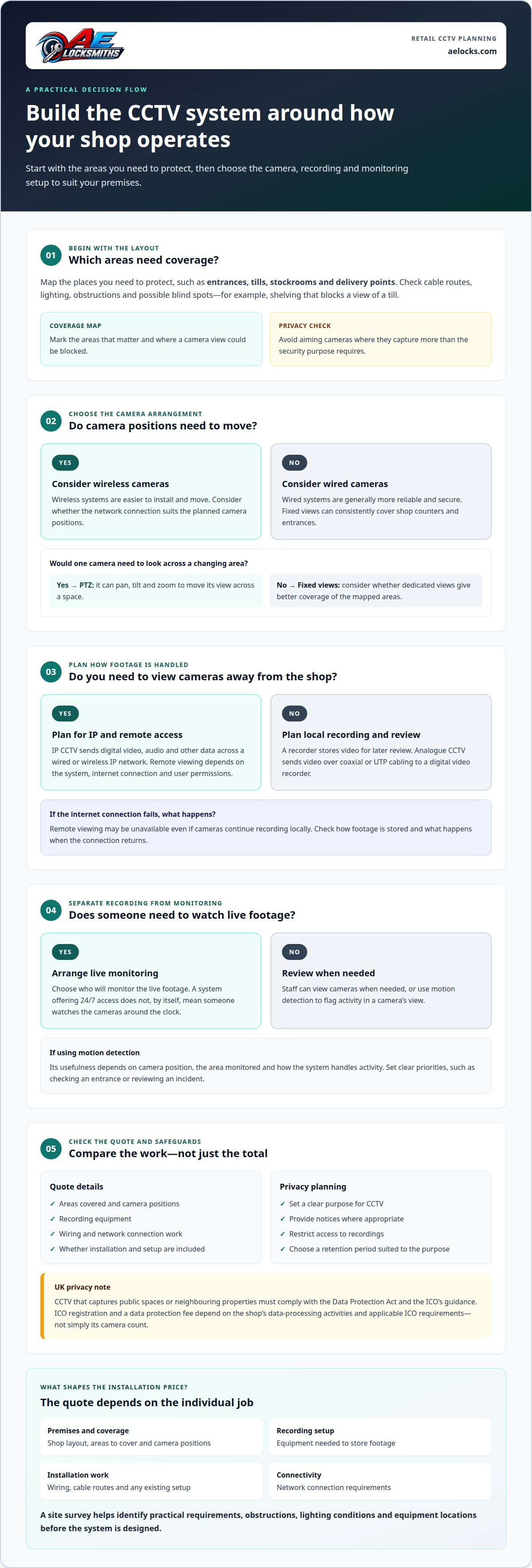
Choose a system for how you’ll use it, not only where the cameras will go. IP cameras can support remote viewing over a network, while recording and monitoring are separate parts of the setup to plan.
This guide explains the main factors behind installation costs and how your shop layout and security priorities shape a CCTV system. You’ll learn what to consider when choosing wired or wireless cameras, planning monitoring and remote access, and placing cameras with privacy in mind. This will help you define what your business needs before arranging an installation.
Key Takeaways
- Understand which parts of a business CCTV installation affect the quote, from camera coverage to wiring and recording equipment.
- Match the system to your premises and security priorities, and keep privacy in mind when planning camera positions.
- Decide how you’ll use monitoring and remote access, including what happens to footage if the internet connection is unavailable.
- See how AE Locksmiths’ CCTV camera installation can help when you’re planning a new system or improving existing security.
How much is a business CCTV install?
Business CCTV costs depend on the premises, camera coverage, recording equipment and installation work. A survey helps identify the practical requirements of a shop, home or industrial site before designing the system.
CCTV installation costs
A retail system may need cameras covering entrances, tills, stock areas and delivery points. A residential installation usually has different coverage needs, while industrial premises may require cameras across larger indoor and outdoor areas. The number and position of cameras, recording setup, wiring and network connection all affect the work involved. The price depends on the individual job and is given after a quote request.
Comparing retail installer quotes
When comparing proposals, check that they cover the same areas, camera positions, recording equipment, wiring and connection work. Ask how the layout addresses entrances, tills and stockrooms, and whether installation and setup are included. Comparing these details makes differences easier to understand than looking at the total alone. Grants depend on each scheme’s eligibility terms, and insurance requirements depend on the policy, so don’t assume either applies to every shop.
Site surveys, design and installation
A site survey maps the areas needing coverage and identifies obstructions, lighting conditions, cable routes and recording equipment locations. The design should account for blind spots, such as shelving blocking a view of a till, and avoid aiming cameras where they capture more than the security purpose requires. In the UK, CCTV that captures public spaces or neighbouring properties must comply with the Data Protection Act and the ICO’s guidance. Set a clear purpose, provide notices where appropriate, restrict access to recordings and choose a retention period suited to that purpose. St Helens Borough Council’s CCTV Code of Practice is based on 12 guiding principles in the Home Office Surveillance Camera Code of Practice 2013. For a shop, these considerations help shape an installation that covers key areas without overlooking privacy.
Choosing a system based on premises, budget and security needs
Start by identifying the areas you need to protect, then match the CCTV system to the building and its existing security setup.
Wired, wireless and PTZ systems
Wired CCTV systems are generally more reliable and secure, while wireless systems are easier to install and move. For a shop with fixed counters and entrances, cameras can be positioned to cover those areas consistently. A PTZ camera can pan, tilt and zoom, allowing its view to move across a space. Consider whether a single adjustable view suits your layout or whether fixed views give better coverage.
Analogue and digital options
Analogue CCTV transmits video over coaxial or UTP cabling to a digital video recorder. IP CCTV sends digital video, audio and other data across a wired or wireless IP network. The choice affects cabling, connectivity and how footage is handled. CCTV may also be compatible with an existing alarm system, helping align camera coverage with the shop’s current security arrangements.
Fire systems and access control serve different purposes from CCTV. Consider how cameras could support the wider security plan, for example by providing a view of an entrance controlled by an access system. Compatibility and intended use should guide the design, rather than assuming every system connects directly.
Camera numbers and data requirements
There’s no fixed camera count for every retail shop. Map the areas that need coverage, such as entrances, tills, stockrooms and delivery points, then check for obstructions and blind spots. This gives you a practical basis for deciding camera positions and identifying gaps in coverage.
ICO registration and a data protection fee depend on the shop’s data-processing activities and applicable ICO requirements, not simply its camera count. Plan how footage will be used and who needs access as part of the system design. For tailored CCTV camera options, consider how the layout, recording approach and existing security equipment fit together.
Do you have 24/7 Monitoring options?
CCTV monitoring can mean viewing live camera feeds, checking recorded footage or arranging for someone to monitor the system. Decide which of these you need before choosing the setup.
Motion detection and monitoring
Motion detection can alert you to activity in a camera’s view, rather than requiring someone to watch every live feed continuously. For example, a shop might use it to flag movement near a stockroom entrance outside trading hours. Its usefulness depends on camera position, the area monitored and how the system handles activity. Set clear priorities, such as checking an entrance or reviewing an incident, before configuring detection.
Monitoring choices range from staff viewing cameras when needed to a separate arrangement for watching live footage. These are not the same as recording: a recorder stores video for later review, whilst monitoring involves looking at activity as it happens. A CCTV system can provide 24/7 access, but that does not by itself mean a person watches the cameras around the clock.
Remote monitoring
Remote monitoring lets an authorised user view cameras away from the premises through an internet connection. A manager could check a shop entrance remotely, then review recorded footage if an event needs closer attention. Access depends on the system, network connection and user permissions. Decide who needs access and use individual accounts where available, rather than sharing one login among staff.
If the internet connection fails, remote viewing may be unavailable even if cameras continue recording locally. Check how the system stores footage and what happens when the connection returns. A practical maintenance routine includes checking camera views, playback, timestamps and network access. These checks can reveal an obstructed lens, a missed recording or a connection problem before you need the footage.
For CCTV installation and maintenance in St Helens, distinguish routine equipment checks from live monitoring. A maintenance visit can assess camera function and recording, while monitoring requires a separate viewing arrangement. Keeping those tasks separate helps you choose a setup that matches your business hours and response needs.
IP cameras and remote access
IP cameras send digital video across a wired or wireless internet protocol network. Rather than routing footage through a video cassette recorder or DVR, they connect to the IT network. This can make remote viewing possible over an internet connection. For a shop manager, that means checking a camera view away from the premises, provided the camera system and network support remote access.
Some IP cameras use a single cable for power and internet connection. This can simplify the camera connection, though the layout still needs to account for cable routes and network access. IP CCTV is also compatible with a 4G access connection. That may suit a site where a wired internet connection is unavailable, but access still depends on a working connection.
Remote access and recording are separate functions. Cameras can record without Wi-Fi by saving footage locally to a DVR, NVR or memory card, but remote access won’t be available without the necessary connection. For example, a shop can retain local footage during an internet outage and review it on site. Plan who needs access and where recorded video will be stored.
Camera detail matters too. The stated resolution for an IP standard camera is 1.3MP, almost four times the size of the best analogue camera. Resolution alone doesn’t determine useful vision: distance, angle, lighting and obstructions also affect what the footage shows. A camera aimed across a shop entrance serves a different purpose from one covering a till, so match the view to the task.
For a practical design, map each camera’s view, network route and recording location, then consider how remote viewing will work if internet access is interrupted. This keeps the system’s purpose clear, whether you need to view activity remotely or retrieve footage locally. Plan your IP camera installation around the coverage and access your premises need.
AE Locksmiths: CCTV Cameras
AE Locksmiths installs CCTV cameras for retail and other business premises in St Helens. It’s a practical next step when you’ve identified the areas that need coverage and want a system designed around your premises, recording needs and preferred access.
For a shop, that could mean planning camera views of customer entrances, tills or stock areas. If you’re upgrading an existing setup, consider how new cameras will work with your current equipment and network connections. Clear priorities help shape the installation around the security needs you’ve identified.
AE Locksmiths also provides commercial locksmith services to support wider premises security planning where appropriate. Contact AE Locksmiths for a free quote on CCTV installation for your premises.
Plan your next step with confidence
Turn your security priorities into a clear installation brief. Note which areas need camera coverage, who will use remote access and how the system should fit your shop’s daily routines. This gives the design a practical starting point and keeps decisions focused on your premises.
For retail security camera installation in St Helens, AE Locksmiths can help plan CCTV around your business needs. Other security services include commercial and residential locksmith work, plus UPVC windows and doors. These can be relevant when you’re considering how cameras fit alongside the physical security of your property.
Every premises has its own layout and priorities. Discuss the areas you want to cover and the way you expect to use the system, then take the next step at a pace that suits your business. Contact AE Locksmiths about retail CCTV to discuss your installation.
Frequently Asked Questions
How does the process work?
Start by defining what the system needs to capture and who will use it. A survey can then inform camera positions, recording arrangements and connection routes. After installation, test the system to check that each view and recording works as intended. For example, test playback from a camera covering a till before relying on the footage to review an incident.
How long will the footage be stored for?
There is no single storage period that suits every shop. Set a retention period based on why footage is recorded, how quickly incidents are usually reported and how much storage the system has. For example, a retailer may need enough time to review a reported stock discrepancy. Limit access to people who need it and remove recordings when they are no longer needed.
What are the benefits of CCTV?
CCTV can help a retailer review events, understand what happened during an incident and provide footage for an internal investigation. A clear view of a till, for example, may help clarify a disputed transaction. Cameras can also help staff monitor areas they cannot see directly. Their usefulness depends on suitable placement, working equipment and a clear process for reviewing recordings.
Which companies install retail CCTV in St Helens, Merseyside?
AE Locksmiths installs CCTV for retail premises in St Helens. When planning an installation, consider how the proposed camera views fit your shop’s layout and how staff will access recordings. A clear brief covering the areas to monitor, recording needs and remote access priorities helps shape a system around your business rather than relying on a generic layout.
How much does retail security camera installation cost in St Helens?
The price depends on the requirements of the individual installation. Factors include the number and position of cameras, cabling routes, recording equipment and any connection work. A small shop with straightforward cabling has different installation needs from premises with several rooms or existing equipment to integrate. AE Locksmiths provides a free quote to clarify the work involved.
What types of CCTV cameras are best for retail shops?
The right camera depends on the view and task. A fixed camera can provide a consistent view of a doorway or checkout, while a PTZ camera can move its view across a wider area. IP cameras can suit shops that need network-based viewing. For example, a retailer might choose different camera types for a till and a stockroom based on each area’s layout and monitoring needs.


